AX3000t救砖
前言 使用的是v2版的,处理器 MT7981B 拆机 准备固件 编译串口工具 先配置 rust 环境 简单的构建,详看README 编译 ATF(RAM BOOT) 开启 RAM BOOT ,注释依赖 进入tui的菜单 …
前言
使用的是v2版的,处理器MT7981B
拆机
准备固件
编译串口工具
git clone https://github.com/981213/mtk_uartboot && cd mtk_uartboot先配置rust环境
sudo pacman -S rust简单的构建,详看README
cargo build --verbose --locked --release --target x86_64-unknown-linux-gnu编译 ATF(RAM BOOT)
git clone -b mtksoc --single-branch https://github.com/mtk-openwrt/arm-trusted-firmware && cd arm-trusted-firmware开启RAM BOOT,注释依赖
--- a/plat/mediatek/apsoc_common/bl2/Config-uart_dl.in
+++ b/plat/mediatek/apsoc_common/bl2/Config-uart_dl.in
@@ -10,7 +10,7 @@ config _RAM_BOOT_RAM_BOOT_UART_DL
 	bool "Enable RAM boot UART download support"
 	depends on _BOOT_DEVICE_RAM
 	depends on !_RAM_BOOT_DEBUGGER_HOOK
-	depends on _INTERNAL
+	# depends on _INTERNAL
 	default n

 # Makefile options
进入tui的菜单
make menuconfig根据实际硬件来,我的是ax3000t v2
g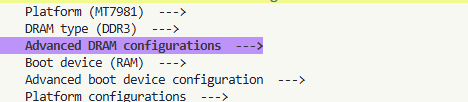
接着在Advanced boot device configguration
选择Enable RAM boot UART download support

Attention : 对于ax3000t使用的MT7981B,需要在Advanced DRAM configuration
把QFN改为BGA
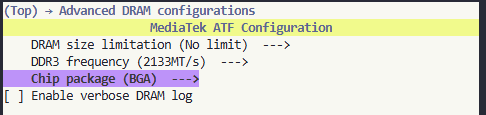
直接退出就好,
make menuconfig .config文件保持在 build/下
好的,在检查一下,
❯ cat .config
# _PLAT_MT7622 is not set
# _PLAT_MT7629 is not set
_PLAT_MT7981=y
# _PLAT_MT7986 is not set
# _PLAT_MT7987 is not set
# _PLAT_MT7988 is not set
PLAT="mt7981"
_SUPPORTS_DDR4=y
_DRAM_DDR3=y
# _DRAM_DDR4 is not set
_SUPPORTS_DRAM_SIZE_LIMIT=y
_SUPPORTS_DDR3_256MB=y
_SUPPORTS_DDR3_512MB=y
_SUPPORTS_DDR4_512MB=y
_SUPPORTS_DDR4_1GB=y
_SUPPORTS_DDR3_FREQ=y
_SUPPORTS_DDR3_1866=y
_SUPPORTS_DDR3_2133=y
_DEFAULT_DDR3_2133=y

#
# Advanced DRAM configurations
#
_DRAM_SIZE_AUTO=y
# _DRAM_SIZE_256MB is not set
# _DRAM_SIZE_512MB is not set
# _DDR3_FREQ_1866 is not set
_DDR3_FREQ_2133=y
DDR3_FREQ_2133=1
# _MT7981_BOARD_QFN is not set
_MT7981_BOARD_BGA=y
BOARD_BGA=1
# _DRAM_DEBUG_LOG is not set
# end of Advanced DRAM configurations

_SUPPORTS_BOOT_DEVICE_SNFI_NAND=y
_SUPPORTS_BOOT_DEVICE_SPIM_NAND=y
_SUPPORTS_BOOT_DEVICE_EMMC_SD=y
_DEFAULT_BOOT_DEVICE_SPIM_NAND=y
# _BOOT_DEVICE_SPI_NOR is not set
# _BOOT_DEVICE_SNFI_NAND is not set
# _BOOT_DEVICE_SPIM_NAND is not set
# _BOOT_DEVICE_EMMC is not set
# _BOOT_DEVICE_SD is not set
_BOOT_DEVICE_RAM=y

#
# Advanced boot device configuration
#
_BROM_NAND_HEADER_HSM=y
# _RAM_BOOT_DEBUGGER_HOOK is not set
_RAM_BOOT_RAM_BOOT_UART_DL=y
RAM_BOOT_UART_DL=1
_DEFAULT_NAND_NMBM=y
# end of Advanced boot device configuration

BOOT_DEVICE="ram"

#
# Platform configurations
#
_SUPPORTS_EMERG_MEM_DUMP=y
# _ENABLE_EMERG_MEM_DUMP is not set
# _ENABLE_JTAG is not set
# _ENABLE_BL31_RUNTIME_LOG is not set
# end of Platform configurations

_BUILD_FIP=y
_SUPPORTS_DUAL_FIP=y
# _DUAL_FIP is not set
BL33="u-boot.bin"

#
# Advanced build configurations
#
# _ENABLE_BL2_COMPRESS is not set
# _ENABLE_FIP_COMPRESS is not set
# _USE_MKIMAGE is not set
# end of Advanced build configurations

_SUPPORTS_AR_V2=y
# _ENABLE_SBC is not set
CROSS_COMPILE="/usr/bin/aarch64-linux-gnu-"
# _LOG_LEVEL_NONE is not set
# _LOG_LEVEL_ERROR is not set
# _LOG_LEVEL_NOTICE is not set
_LOG_LEVEL_WARNING=y
# _LOG_LEVEL_INFO is not set
# _LOG_LEVEL_VERBOSE is not set
LOG_LEVEL=30直接编译make CROSS_COMPILE=aarch64-linux-gnu-
文件目录 arm-trusted-firmware/build/mt7981/release
这里我们只用bl2.bin文件,所以fip编译出错可以不管
编译u-boot
参考这位的博客mt798x uboot 功能介绍
git clone https://github.com/hanwckf/bl-mt798x && cd bl-mt798xSOC=mt7981 BOARD=ax3000t_an8855 ./build.sh编译好的文件在output/,这里我们只用fip.bin文件
刷入
我用的是喜闻乐见的土豪金341A,把短接换到说明的2-3pin
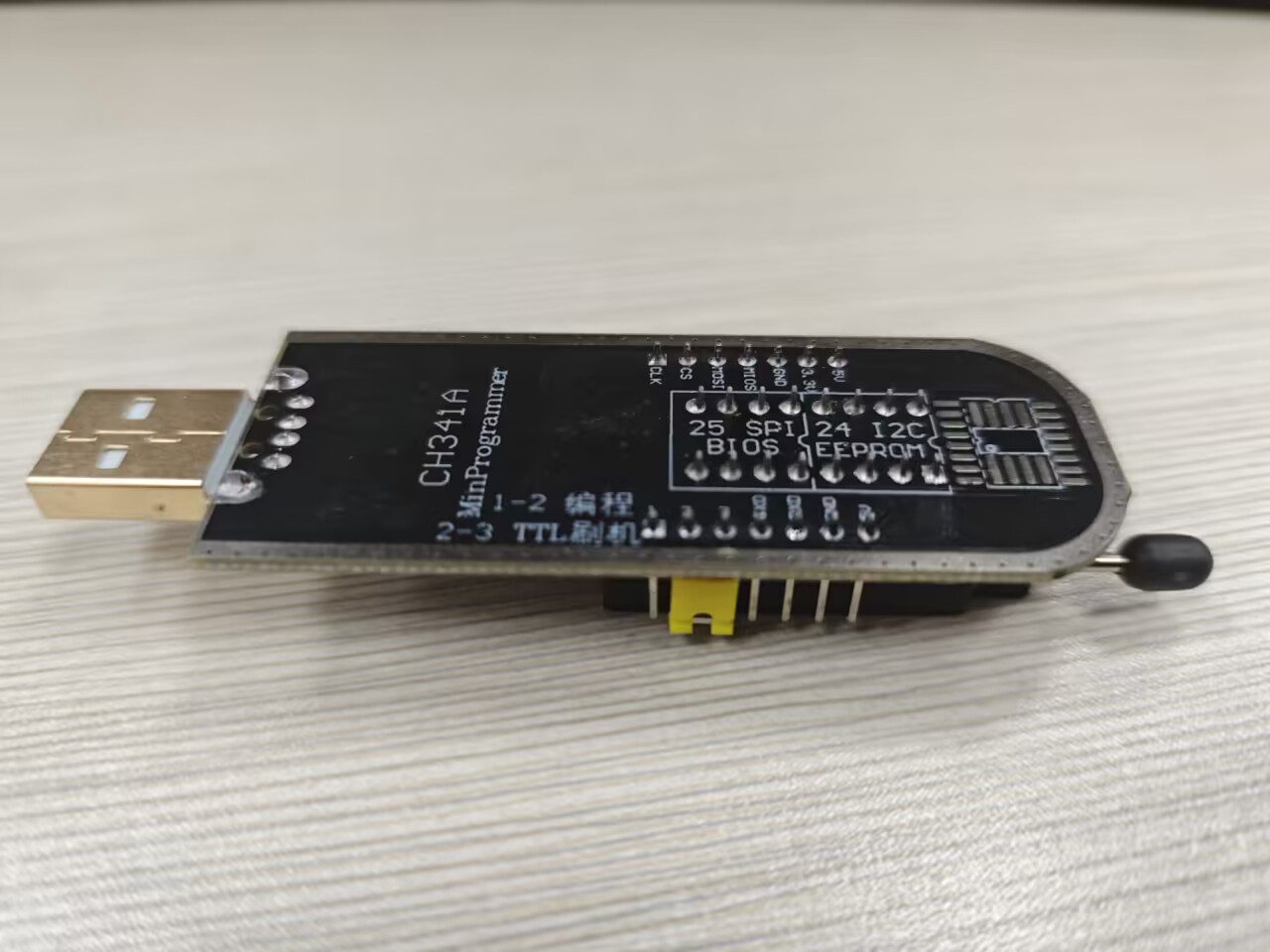
一般是免驱的,插入后看看usb是否识别
lsusb && ls /dev/❯ lsusb && ls /dev/
Bus 001 Device 001: ID 1d6b:0002 Linux Foundation 2.0 root hub
Bus 001 Device 002: ID 0c45:6366 Microdia Webcam Vitade AF
Bus 001 Device 003: ID 8087:0029 Intel Corp. AX200 Bluetooth
Bus 001 Device 007: ID 1a86:5523 QinHeng Electronics CH341 in serial mode, usb to serial port converter
Bus 002 Device 001: ID 1d6b:0003 Linux Foundation 3.0 root hub
Bus 003 Device 001: ID 1d6b:0002 Linux Foundation 2.0 root hub
Bus 003 Device 002: ID 34d1:0608 USB2.0 HUB
Bus 004 Device 001: ID 1d6b:0003 Linux Foundation 3.0 root hub
Bus 005 Device 001: ID 1d6b:0002 Linux Foundation 2.0 root hub
Bus 006 Device 001: ID 1d6b:0003 Linux Foundation 3.0 root hub
Bus 007 Device 001: ID 1d6b:0002 Linux Foundation 2.0 root hub
Bus 007 Device 002: ID 1038:1840 SteelSeries ApS SteelSeries Prime Wireless
Bus 008 Device 001: ID 1d6b:0003 Linux Foundation 3.0 root hub
autofs i2c-11 ptp0 tty3 tty8 usb
block i2c-12 pts tty30 tty9 userfaultfd
btrfs-control i2c-13 random tty31 ttyS0 userio
bus i2c-14 rfkill tty32 ttyS1 v4l
char i2c-15 rtc tty33 ttyS10 vcs
console i2c-16 rtc0 tty34 ttyS11 vcs1
core i2c-17 serial tty35 ttyS12 vcs2
cpu i2c-18 shm tty36 ttyS13 vcs3
cpu_dma_latency i2c-2 snapshot tty37 ttyS14 vcs4
cpu_wakeup_latency i2c-3 snd tty38 ttyS15 vcs5
cuse i2c-4 stderr tty39 ttyS16 vcs6
dbc i2c-5 stdin tty4 ttyS17 vcsa
disk i2c-6 stdout tty40 ttyS18 vcsa1
dma_heap i2c-7 tpm0 tty41 ttyS19 vcsa2
dri i2c-8 tpmrm0 tty42 ttyS2 vcsa3
drm_dp_aux0 i2c-9 tty tty43 ttyS20 vcsa4
drm_dp_aux1 input tty0 tty44 ttyS21 vcsa5
drm_dp_aux2 kfd tty1 tty45 ttyS22 vcsa6
drm_dp_aux3 kmsg tty10 tty46 ttyS23 vcsu
drm_dp_aux4 kvm tty11 tty47 ttyS24 vcsu1
drm_dp_aux5 log tty12 tty48 ttyS25 vcsu2
drm_dp_aux6 loop-control tty13 tty49 ttyS26 vcsu3
fb0 mapper tty14 tty5 ttyS27 vcsu4
fd media0 tty15 tty50 ttyS28 vcsu5
full mem tty16 tty51 ttyS29 vcsu6
fuse mqueue tty17 tty52 ttyS3 vfio
gpiochip0 net tty18 tty53 ttyS30 vga_arbiter
hidraw0 ng0n1 tty19 tty54 ttyS31 vhci
hidraw1 ntsync tty2 tty55 ttyS4 vhost-net
hidraw2 null tty20 tty56 ttyS5 vhost-vsock
hidraw3 nvme0 tty21 tty57 ttyS6 video0
hidraw4 nvme0n1 tty22 tty58 ttyS7 video1
hidraw5 nvme0n1p1 tty23 tty59 ttyS8 vmci
hpet nvme0n1p2 tty24 tty6 ttyS9 watchdog
hugepages nvram tty25 tty60 ttyUSB0 watchdog0
hwrng port tty26 tty61 udmabuf zero
i2c-0 ppp tty27 tty62 uhid
i2c-1 psaux tty28 tty63 uinput
i2c-10 ptmx tty29 tty7 urandom你应该看到Bus 001 Device 007: ID 1a86:5523 QinHeng Electronics CH341 in serial mode, usb to serial port converter 和 ttyUSB0
加入用户组
sudo usermod -aG tty $USER && sudo usermod -aG uucp $USER需要重启设备,
id,看看用户组
串口工具
直接用恩山论坛的
参考[2026.03.27更新]MTK路由器串口刷机(救砖)工具-OPENWRT专版-恩山无线论坛 - Powered by Discuz!
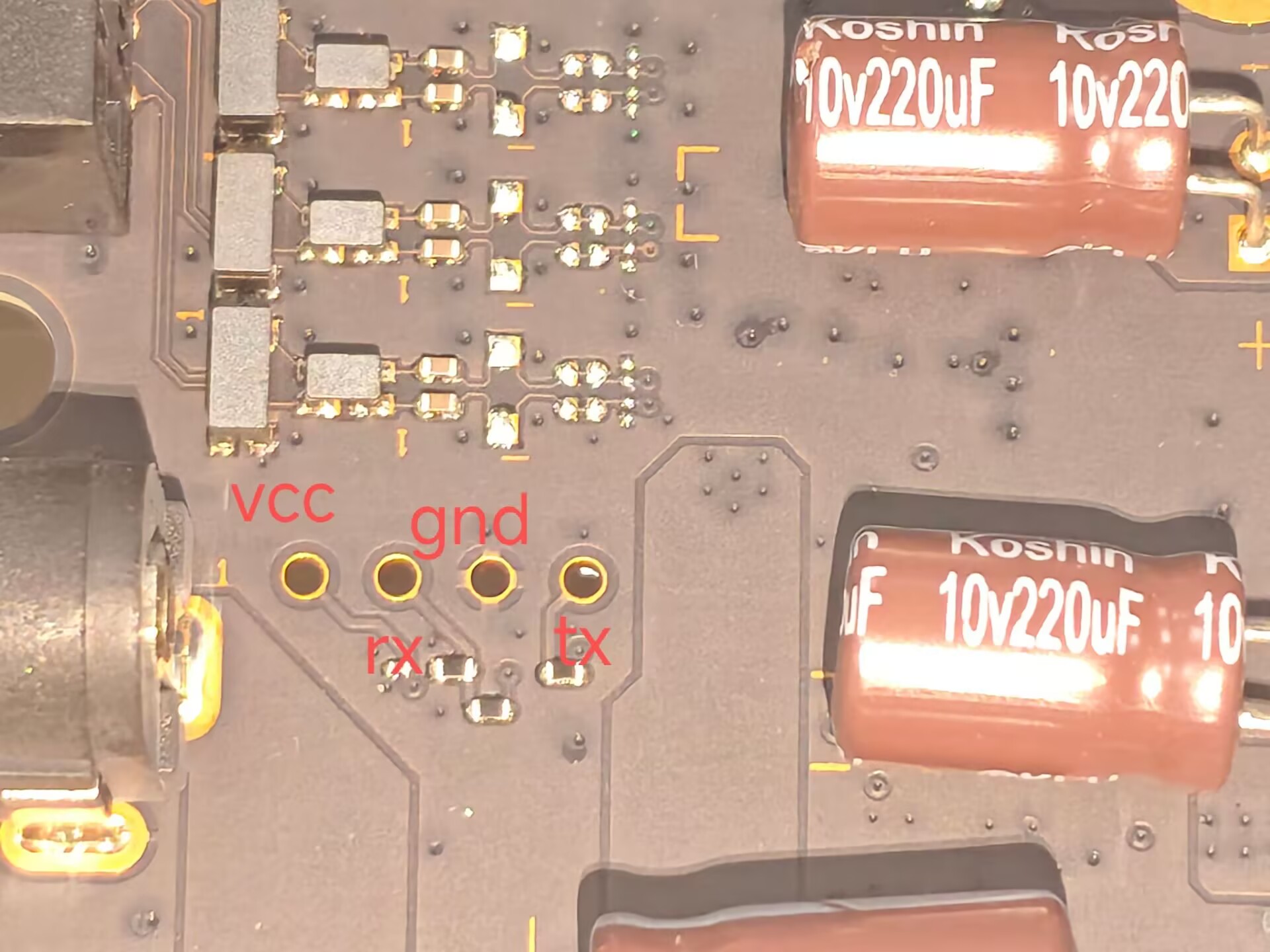
接线
依旧 tx to rx , rx to tx ,gnd tognd
原始笔记:硬件/ax3000t救砖.md